
What Are Windows Update Rings?
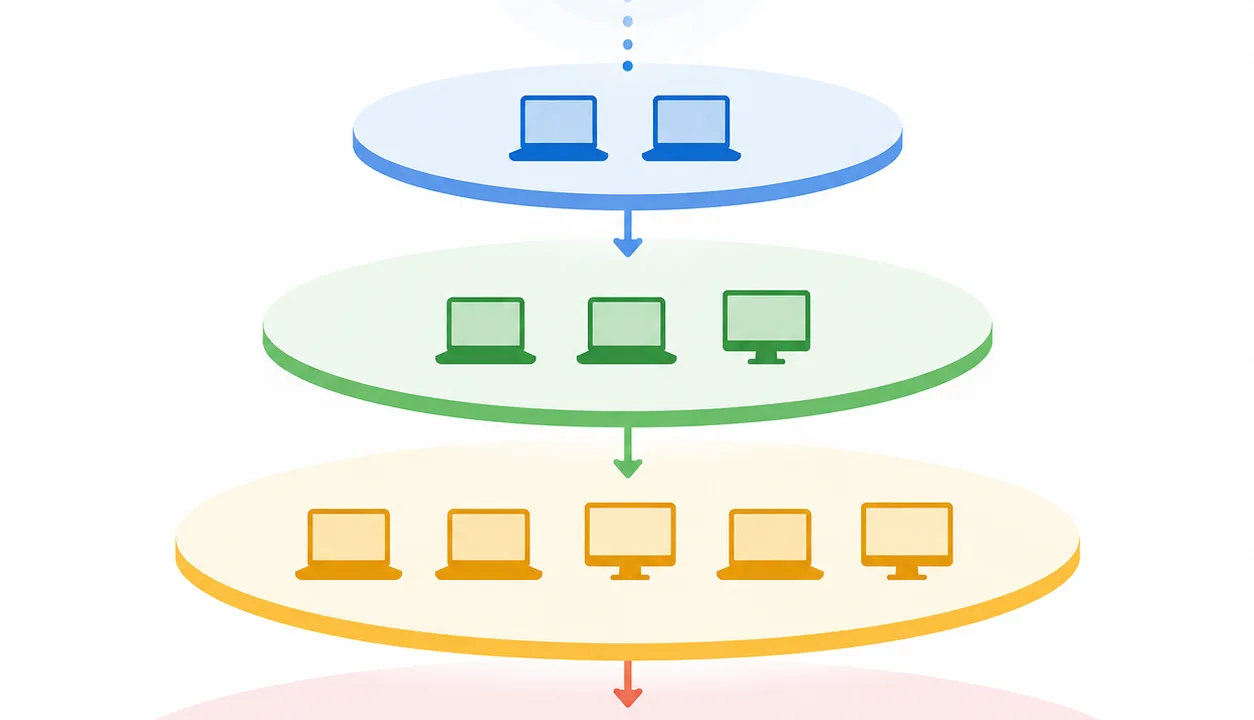
Windows Update Rings are deployment groups that allow IT teams to roll out updates to different sets of devices in phases. They are designed to reduce risk by testing updates on smaller groups before wider deployment, helping organizations automate patch management more safely and efficiently.
Why Update Rings Matter
Update rings help:
- Prevent widespread issues
- Test updates safely
- Control rollout timing
- Reduce downtime
Without them, updates are applied uniformly, increasing risk.
How Windows Update Rings Work
A typical structure includes:
Pilot Ring
Small group of test devices.
Early Adoption Ring
Larger group for validation.
Broad Deployment Ring
All remaining devices.
This phased approach ensures stability and control.
Key Benefits of Update Rings
- Reduced risk of failed updates
- Controlled deployment
- Better testing and validation
- Improved user experience
Best Practices for Using Update Rings
- Start with a small pilot group
- Monitor update performance
- Adjust rollout timing based on results
- Separate critical systems into dedicated rings
Common Mistakes to Avoid
- Deploying updates too quickly
- Not monitoring pilot results
- Using too few rings
- Ignoring rollback planning
How Level Supports Patch Deployment Strategies
Level helps manage update strategies with:
- Device grouping and tagging
- Patch scheduling and automation
- Monitoring and reporting
This allows IT teams to implement phased deployments effectively.
Key Takeaways
- Update rings reduce deployment risk
- Phased rollout improves stability
- Testing is critical before full deployment
- Monitoring ensures successful updates
FAQ: Windows Update Rings
What is a Windows Update Ring?
It is a group of devices that receive updates at the same time.
Why use multiple rings?
To test updates before wide deployment.
How many rings should you use?
Typically three: pilot, early, and broad deployment.
Meta Package
Meta Title
Meta Description
Blog Summary