New device detected
Automations
Stop reacting. Start automating.
Respond to changes the moment they happen. Watch live as the automation runs across every matching device.
One change starts the work.
The workflow moves before the queue grows.
Schedule
One-time, hourly, daily, weekly, or monthly.
Tag applied or removed
The automation runs immediately.
A new device enrolls
Onboarded before anyone files a ticket.
Device enters or leaves a group
The workflow runs when membership changes.
A monitor fires
Remediation starts before the queue opens.
Webhook
An external system can start the workflow.
Custom field changed
A field update can start the workflow.
Manual
Run the workflow yourself. No event required.
The moment something changes.
Level starts the workflow now.
The event starts it.
A tag, enrollment, monitor, or schedule starts the workflow now, not on the next cycle.
Conditions scope the run.
Device attributes, operating systems, groups, and tags determine which devices match.
Actions run live per device.
Watch each matching device move through the workflow as every action runs.
Don't take our word for it.
Operators and IT teams, in their own words.
“I’m really digging Level.io as well. Fast UI, relatively easy to work with, and the automation engine is so far doing everything I’ve been dreaming up.”
athlonduker/msp · Reddit “Level gives us the power for only a few technicians to manage hundreds of endpoints from anywhere in the world with real-time insight.”
Justin HayesCEO · Bascom Logistics “Like others have said, our team is also really enjoying Level. It’s very refreshing to have a super modern and sleek interface, great Linux support, and a development team that actually listens to feedback. It’s also really exciting to see the new features roll out basically every month.”
GoodHeartTechr/msp · Reddit “Level has brought us the multi-OS management software we need at a reasonable price. Its modern UI makes it easy to work with systems individually and in bulk.”
ExisorIT team “I personally use Level.io internally here at NovaBACKUP to monitor production endpoints around the world. It works very well, saves us a ton of time with automations, monitoring, and alerts, and the company has been very responsive for any support issues or feature requests.”
NovaBACKUP-Nater/SmallMSP · Reddit “After migrating 600 devices to Level with their easy PowerShell install script, we have started to use Level RMM much more than our previous RMM. Level just works. New releases happen frequently. The roadmap is very exciting, and we can’t wait for the mobile app.”
Grissom TechCustomer testimonial “Level.io made me a custom script to install MSI apps pretty quickly after I opened a support ticket. I think they’re fantastic.”
miketunesr/msp · Reddit “Level is such a breath of fresh air in the RMM space. The GUI looks clean, intuitive, modern and is very responsive.”
Easton UtilitiesIT team

Build visually. Add code when you need it.
PowerShell, Bash, and Python stay in the same workflow.
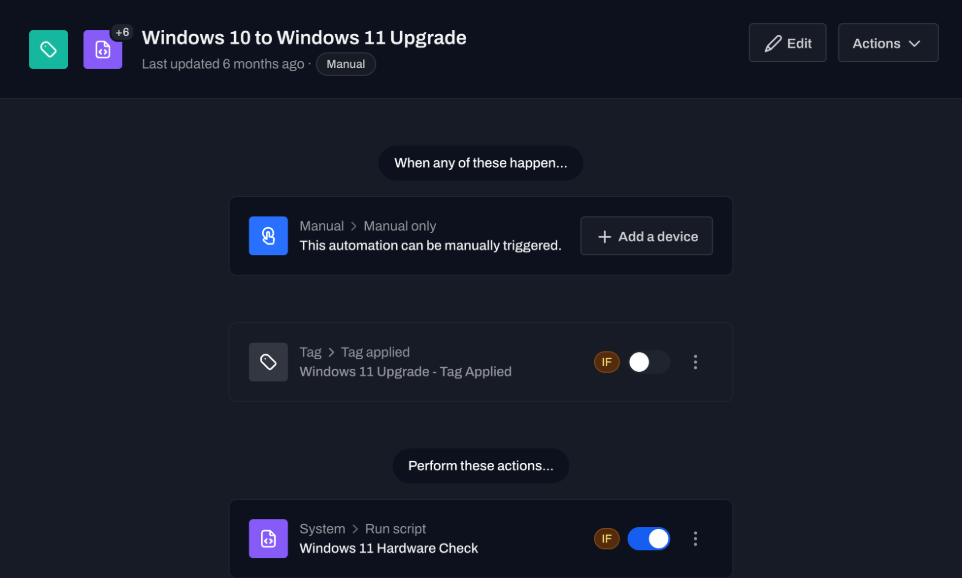
Click the workflow together.
Set the event, conditions, and actions in the visual builder.
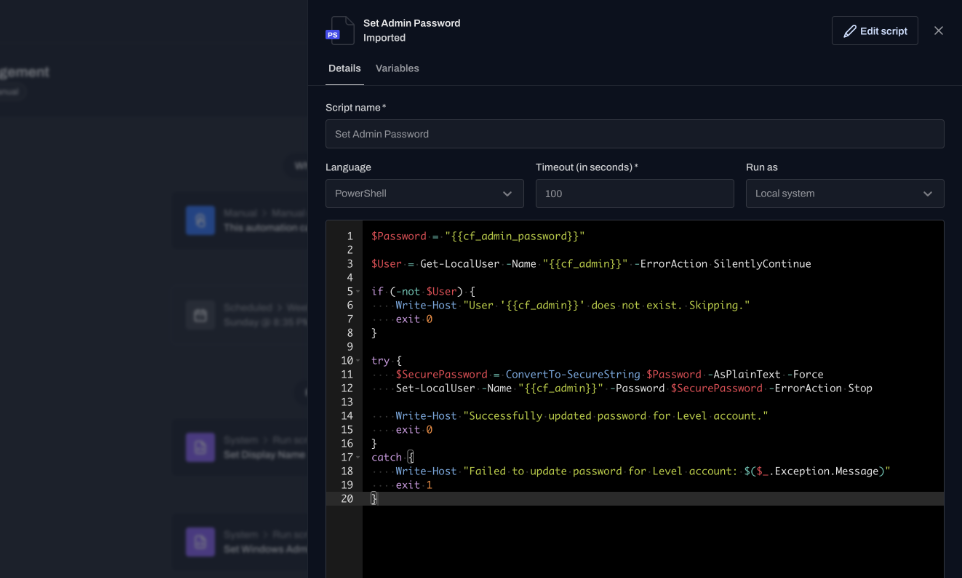
Drop in a script.
Run PowerShell, Bash, or Python alongside the visual steps.
Then the workflow does the work.
Scripts, updates, files, and alerts. Live per device.
System
Run scripts, restart devices, manage processes and services, or set registry keys.
Flow
Pause for approval, wait for a user, add a delay, branch, or call another automation.
Files
Download files directly to a device from a URL.
Level
Set custom fields, create alerts, apply tags, move devices, or toggle maintenance mode.
Security
Install OS updates, manage Windows Defender, or rotate disk-encryption keys.
App management
Install, remove, or upgrade apps with WinGet, Homebrew, and Linux package managers.
Notifications
Notify a technician or end user in-app, by SMS, or by email.
HTTP
Send an HTTP request to an outside system.
Your workflows, your rules.
Choose from a growing library of events and actions to automate onboarding, patching, remediation, compliance, and everything in between.
ACME Corporation, Dunder Mifflin, Workstations
Every day at 2:00 AM
ADNS, Debug
December 28, 2026 at 2 PM
Monitoring - General / Disk Monitor - Critical
This automation can be manually triggered.
New device detected
Webhook
Cleanup Disk Space
Wait for approval
Install Windows updates
ARM, Exchange
POST /v1/incidents
HKEY_LOCAL_MACHINE\Software\Office365
Your device will undergo maintenance soon. Please save your work to avoid losing changes.
BIOS_Update_Firmware.exe
“Level boasts top-notch automation and scripting capabilities, handles patch management efficiently, provides robust remote management tools, and most importantly, it is regularly updated with new features.”
Lance Hietpas
IT Director · YMCA
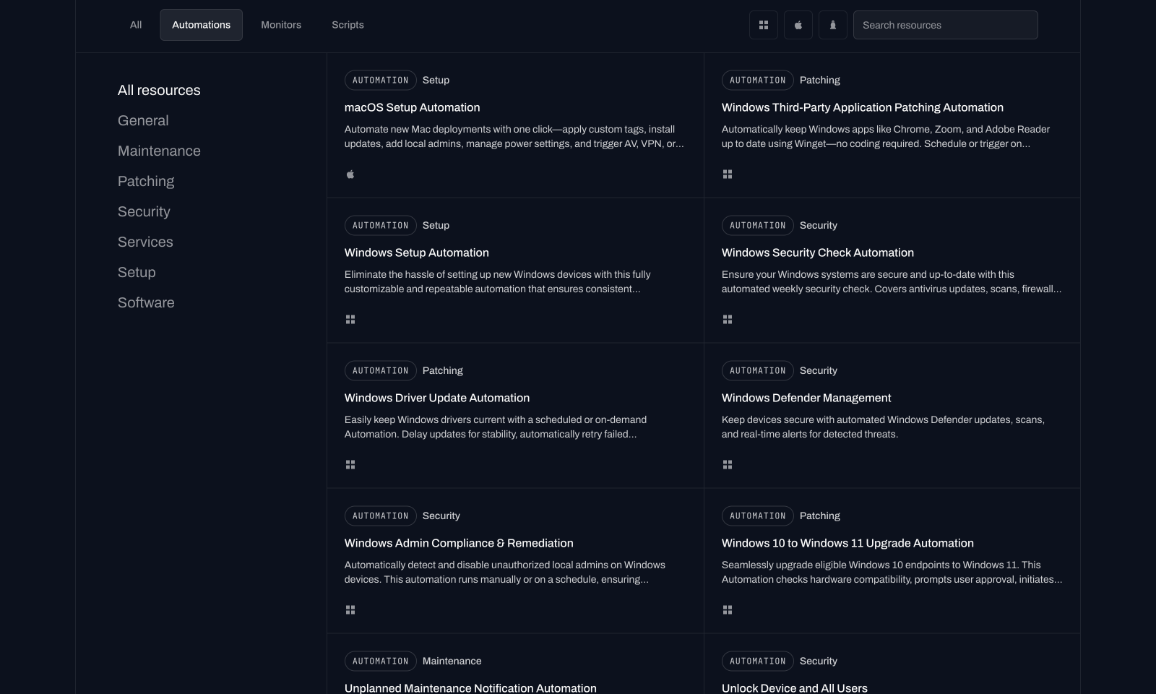
Start from the library.
Import a prebuilt automation. Share your own.
Questions before the first workflow.
Direct answers about triggers, platforms, and how workflows start.
Can a monitor start an automation?
Yes. When a monitor fires, the workflow can start on that device immediately.
Do I have to write code?
No. Build it visually. Drop in PowerShell, Bash, or Python when clicks aren't enough.
Is there a trial?
First 10 devices are free, with no time limit. Same features as paid.
Are automations cross-platform?
Yes. The same workflow runs on Windows, macOS, and Linux endpoints.
Do they run in real time?
Yes. An event starts the workflow immediately. You watch it live across every matching device.
Can another tool start an automation?
Yes. A webhook trigger lets an outside system start the workflow.
Run it on your own fleet.
Start with 10 devices. Build one automation. Watch it hit every device that matches.